
Lumber GO!
SeikamiArcade
4.5388.00 Reviews
- Version
- 0.1.10
- Installs
- 100.00K
- Age Rating
- Everyone
Screenshots



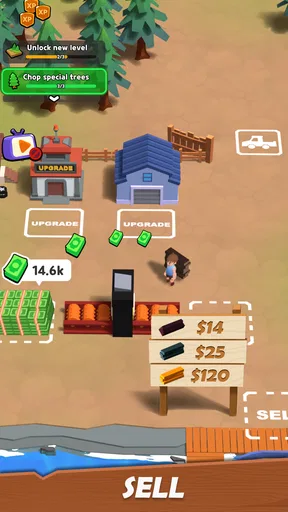
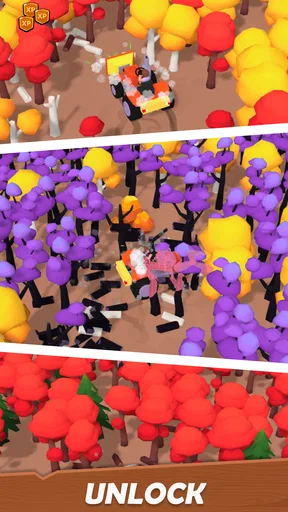
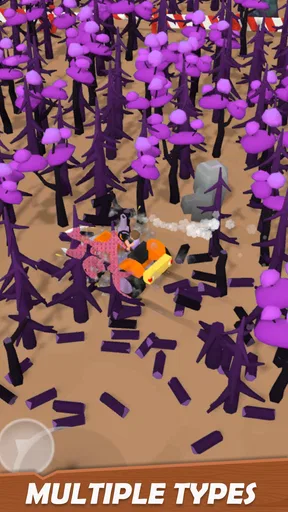
Our Review of Lumber GO!
 Analysis by Appyee
I spent time with Lumber GO! as a compact arcade game built around a simple fantasy: run a lumber mech, cut timber, sell it, and use the proceeds to improve your operation. That loop is easy to understand within moments, which is exactly what I want from a game designed for short sessions. It does not ask me to learn a complicated story or decode a large menu system before I can play.
What makes the game worth examining more closely is how that simplicity affects different players. A straightforward control scheme can be welcoming, but only if the action remains readable, the interface does not become tiring, and progress does not depend on constant precision. My experience was generally positive for casual play, although the game is more comfortable for some situations and abilities than others. It is a free arcade title from Seikami, available to an Everyone audience, with optional purchases priced at $4.99 per item.
How the core loop feels in everyday play
The basic rhythm is pleasantly direct. I move into the role of the lumber mech, gather wood, turn that work into money, and then decide how to improve the operation. There is a satisfying sense of visible progress because the effort in one activity feeds the next. Instead of asking me to manage a huge collection of unrelated systems, Lumber GO! keeps returning to its central work-and-upgrade cycle.
That makes it particularly suitable for the kind of play many people actually fit into a busy day. I can imagine opening it while waiting for a train, taking a short break between tasks, or playing for a few minutes before bed. The game does not require the emotional investment of a long adventure, and its arcade identity is clear from the first session. If you prefer games with deep character development, elaborate exploration, or a detailed narrative, this focused structure may feel too narrow.
The developer, Seikami, has chosen a concept that is immediately recognizable without making the player feel lost. The lumber-mech theme gives the ordinary act of collecting resources a playful identity. I found that helpful because the game’s appeal is less about surprise and more about the small satisfaction of making the machine and its business more effective over time.
The progression also creates a useful decision point: should I keep working with the current setup, or spend what I have earned on an improvement? That choice gives the arcade action a little more purpose than a score chase alone. At the same time, players should not expect a complex economic simulation. The appeal comes from quick feedback and steady advancement, not from balancing a detailed timber market.
Readability and navigation during a session
The strongest accessibility quality is the clarity of the main idea. Cutting, selling, and upgrading are distinct concepts, so I rarely had to wonder what the game wanted me to do next. This matters for players who find dense interfaces tiring or who prefer learning by doing rather than reading long explanations.
In practical use, I would approach the first session slowly rather than immediately tapping through every prompt. Paying attention to which screen handles selling and which one handles improvements makes later sessions smoother. That small habit is useful because arcade games often encourage quick tapping, but rushing through the early guidance can make a simple loop feel less organized than it really is.
The interface is best suited to players who can comfortably identify visual targets and follow changes on screen. I found the central activity easier to understand than a typical strategy game with several layers of menus. However, visual simplicity is not the same as full accessibility. Anyone who needs large text, strong contrast, spoken labels, or extensive interface customization should check the actual presentation on their device before committing to long sessions.
For people with attention-related difficulties, the narrow objective can be an advantage. There are fewer competing goals to hold in mind, and the next useful action is usually connected to the current resource loop. I would still recommend playing in a quiet setting during the first run, because learning the relationship between work, money, and upgrades is easier when notifications and other distractions are not competing for attention.
Navigation is also more manageable when I treat each visit as a small routine: start the work, watch the resource outcome, sell when appropriate, then inspect the available improvement. That sequence reduces unnecessary back-and-forth and helps prevent spending resources impulsively. It is a modest strategy, but it makes the game feel more controlled, especially for players who prefer predictable workflows.
Motor demands and sensory comfort
Lumber GO! is a better fit for players who enjoy direct touch interaction than for anyone looking specifically for hands-free or low-input play. The game’s arcade nature suggests an active relationship with the screen, and that can be enjoyable when I want something responsive. It may be less comfortable for people dealing with hand fatigue, tremors, limited reach, or difficulty with repeated taps.
One useful approach is to play with the device supported on a table rather than holding it throughout the session. That removes some strain from the wrist and leaves the tapping hand more relaxed. I also found that short sessions make more sense than trying to turn this into a long uninterrupted game. The resource loop is naturally suited to breaks, and stopping before hand or eye fatigue sets in keeps the experience more pleasant.
Players who are sensitive to busy motion or repeated visual changes should pay attention to how the action feels over time, not just during the opening minutes. An arcade game can seem calm while learning the controls and more demanding once the player is focused on efficiency. If visual stimulation becomes uncomfortable, lowering the device brightness and taking regular pauses may help, although those are general device adjustments rather than special game features.
Sound is another personal consideration. I did not treat audio as essential to understanding the lumber operation, so someone who prefers to play quietly can still approach the game through its visual feedback. That is convenient in shared spaces such as a waiting room or a family living room. On the other hand, players who rely on audio cues should not assume that every important event is communicated through sound; the safest way to follow progress is to watch the screen.
The game’s Everyone rating makes it approachable from an age standpoint, but age suitability and physical comfort are different questions. A younger player may understand the loop quickly while still tiring from repeated interaction. An older player may appreciate the uncomplicated objective but prefer a larger screen. In both cases, the device itself can make a meaningful difference to comfort and readability.
Using the game in different situations
The best everyday scenario for Lumber GO! is a short, interrupted window. I would play it while waiting for an appointment, then put it down without worrying about forgetting a complicated plot or losing track of a large quest. Its work-to-upgrade structure gives each small visit a clear purpose, which is more convenient than a game that only feels rewarding after a long uninterrupted session.
It also works well as a low-commitment alternative to more demanding arcade games. Many titles in the category emphasize reflexes, rapid timing, or high-score repetition. Lumber GO! adds a light management layer, so even a modest session can contribute to a longer-term improvement. That makes it a reasonable choice for someone who enjoys arcade movement but wants a little more persistence between visits.
There is a trade-off when playing in noisy or distracting places. The simple objective is easy to remember, but visual attention still matters. On a crowded commute, I would avoid making important upgrade decisions while standing or moving, because a missed tap or rushed choice can be more frustrating than the actual challenge. The game is portable, but portability does not mean every moment is equally suitable for focused play.
For families, the Everyone rating and plain premise make it easier to recommend than a game built around mature themes. I would still guide a child through the purchase areas before handing over the device. Optional in-app purchases cost $4.99 per item, so the game can be free to start while still presenting spending decisions. Setting device-level purchase controls is sensible for shared devices, particularly when a child is attracted to faster progress.
Players with limited connectivity expectations should also think about how they intend to use it. I would not promise a particular offline experience without checking the current behavior on the device. If the main goal is a dependable game for flights, remote areas, or places with unreliable service, testing it in that exact situation before traveling is the practical choice.
Where it differs from familiar arcade alternatives
Compared with a pure endless runner or reflex game, Lumber GO! gives my actions a more tangible reason. I am not only trying to survive another round or beat a previous score; I am feeding a cycle of collection, selling, and improvement. That can make the game feel more forgiving for players who enjoy gradual progress but do not want a demanding competitive environment.
Compared with a full management game, it is much easier to approach. I do not need to study a complicated production chain or remember a large set of long-term obligations. The cost of that accessibility is depth. Someone who enjoys detailed planning, multiple resources, staff management, or a richly simulated economy may quickly find the lumber operation too streamlined.
It also sits apart from story-driven mobile games. There is no need for me to wait for a dramatic scene before a session feels worthwhile. The reward is mechanical and immediate: perform the work, convert the result, and improve the machine or business. That is a strength for players who want a clear activity, but a weakness for anyone who needs characters and narrative stakes to stay engaged.
The free entry point helps reduce the risk of trying it. The game has an average rating of 4.5 from around 4.3 thousand ratings, and it has passed 100 thousand installs, which suggests that the straightforward concept has found an audience. Those figures do not replace personal testing, especially for accessibility, but they do show that the game is not an obscure experiment with no established player interest.
Remaining barriers and practical workarounds
The biggest limitation is that the game’s simplicity does not automatically solve every access need. Players who require adjustable text size, high-contrast presentation, alternative control methods, or spoken interaction may encounter barriers if those options are not available in the version they use. I would treat the first session as a comfort test: can you see the important elements, reach the controls without strain, and understand progress without relying on a single sensory channel?
Repeated interaction can also become a problem for people with pain or reduced dexterity. A useful workaround is to avoid chasing maximum efficiency. There is no need to turn every session into a speed test. Slowing down, using a stable surface, and taking breaks can make the loop less demanding. If the game only feels enjoyable when played rapidly, it may not be the right arcade choice for someone whose hands fatigue quickly.
Small screens may create another obstacle. The game is easier to assess on a device where the action and resource information are comfortably separated. On a compact phone, I would increase system text size only if it does not interfere with the game’s layout, and I would rotate between shorter sessions rather than leaning close to the display. These steps cannot add missing accessibility tools, but they can improve basic comfort.
There is also a progression trade-off connected to the optional purchases. A player who wants to advance without spending should be prepared to engage with the normal work-and-upgrade rhythm rather than expecting every improvement immediately. Someone who is particularly sensitive to purchase prompts may prefer a game with no in-app buying at all. In a family setting, purchase restrictions are more important than the Everyone label alone.
The current version is 0.1.10, so I approached it as a game that may still feel early in its development rather than as a fully mature arcade platform. That does not make it unsuitable, but it does affect expectations. Players who enjoy seeing a compact concept take shape may be comfortable with that position. Those who want years of accumulated modes, customization, and accessibility refinement may be happier with a longer-established alternative.
Who should try it and who should skip it
I would recommend Lumber GO! to someone who wants a free, easy-to-grasp arcade game with a light progression layer. It is especially appealing if you like the feeling of improving a machine or operation but do not want the complexity of a full business simulator. The lumber-mech theme gives the routine enough personality to keep the basic loop from feeling completely anonymous.
I would also suggest it to players who prefer flexible short sessions. The game’s structure makes sense when I have only a few minutes, and the clear sequence of work, sell, and upgrade helps me return without relearning everything. It can be a pleasant companion for waiting times, provided the screen remains comfortable and the surroundings allow enough attention for the active parts.
I would skip it if your priority is deep strategy, a substantial story, or advanced accessibility customization. I would also look elsewhere if repeated touch interaction is painful or if you need a game designed around alternative input from the start. A pure puzzle game may be better for someone who wants slower, deliberate decisions, while a reflex-focused arcade title may be more satisfying for someone who wants constant action rather than economic progression.
Device compatibility is fairly broad: the game supports a minimum operating system of Android 7.1. That makes it relevant to people using older Android hardware, although the real comfort of play will still depend on screen size, performance, and how clearly the device displays the interface. I would install it on the device you actually plan to use rather than judging the experience from specifications alone.
My inclusive verdict
After playing it, I see Lumber GO! as a friendly, focused arcade game whose strongest inclusive quality is its understandable purpose. I never felt buried under a complicated system, and the lumber-mech premise gives casual players an immediate reason to keep going. Its free price makes experimentation easy, while the Everyone rating broadens its potential audience.
Still, I would not call it universally accessible. The active touch loop may exclude players with motor limitations, and anyone needing specific visual, auditory, or input accommodations should test the game carefully. The best experience comes from a comfortable device, short sessions, deliberate tapping, and realistic expectations about the game’s early-stage scale.
My final recommendation is therefore conditional but positive: try it if you want a readable arcade routine with gradual upgrades and you are comfortable with touch controls. Keep purchase controls in place on shared devices, avoid playing through fatigue, and judge the interface on your own screen. For me, the balance of quick action and small-business progression is more interesting than a standard score chase, even though players seeking depth or extensive accessibility options will probably outgrow it.
Verdict
Strengths of Lumber GO!
- Simple controls make it easy to start playing immediately.
- Short rounds are ideal for quick gaming sessions.
- Colorful visuals give the game a cheerful, accessible style.
- Progression provides a reason to keep improving your results.
- The casual format works well for players of different ages.
Limitations of Lumber GO!
- Gameplay can feel repetitive after extended play sessions.
- Some levels may lack enough challenge for experienced players.
- Ads may interrupt the experience, depending on the version.
- Limited variety can reduce long-term replay value.
- Performance may vary on older or less powerful devices.
Other Releases by Seikami
View All
Miner GO!
Arcade4.5
Similar Picks in This Category
View All
Subway Surfers
SYBO Games4.6

Stickman Party 234 MiniGames
PlayMax Game Studio4.6

Subway Princess Runner
Ivy4.4

Temple Run
Imangi Studios4.2

Zombie Tsunami
Mobigame SAS4.6

Stack Ball - Crash Platforms
CASUAL AZUR GAMES4.5
Frequently Asked Questions
What is Lumber GO! and how is the gameplay structured?
Lumber GO! is a casual resource-management game focused on cutting trees, collecting wood, and expanding your lumber operation. During a typical session, you control workers or automated production systems, improve equipment, and use collected materials to unlock new areas or upgrades. The gameplay is designed for short sessions, making it suitable for players who enjoy simple progression rather than complex strategy.
Is Lumber GO! free to download and play?
Lumber GO! can generally be downloaded and played without an upfront purchase, but the free experience may include advertising and optional in-app purchases. These purchases can sometimes speed up construction, increase production, unlock bonuses, or provide additional resources. You can usually progress without spending money, although patience may be required when timers, limited energy, or upgrade costs become more demanding.
Does Lumber GO! require an internet connection?
An internet connection may be needed for certain features in Lumber GO!, especially advertisements, cloud-related functions, events, updates, and purchase verification. Basic gameplay may work offline in some situations, but the available features can change depending on the version and device. If you plan to play while traveling, it is best to test the game offline before relying on it without mobile data or Wi-Fi.
Are there advertisements or optional purchases in Lumber GO!?
Yes, players should expect Lumber GO! to include advertising and optional in-app purchases, as is common with free-to-play casual games. Advertisements may appear between activities or be offered as a way to receive extra rewards, while purchases can provide currency, boosts, or faster progress. Before downloading, review the store listing and your device’s purchase settings, particularly if children may use the device.
Is Lumber GO! suitable for children and casual players?
Lumber GO! is likely to appeal to casual players because its controls and objectives are easy to understand, with progress built around collecting resources and improving production. However, parents should check the age rating, advertising content, privacy information, and in-app purchase options before allowing younger children to play. The game may be appropriate for short, relaxed sessions, but monetization and repeated reward prompts are worth considering.
Play our best games!


